> For the complete documentation index, see [llms.txt](https://docs.powermonitor.com.br/llms.txt). Markdown versions of documentation pages are available by appending `.md` to page URLs; this page is available as [Markdown](https://docs.powermonitor.com.br/en/power-monitor/governanca/conformidade/privacidade-e-conformidade.md).
# Privacy and compliance
Overview of the privacy and compliance screens in Power Monitor (LGPD and GDPR): personal data discovery, risks, compliance posture and access reviews. Decision support, not legal advice.
Power Monitor helps your organization see where there is **personal data** in the Power BI/Fabric environment, who has access to it and how the organization stands against security and privacy controls, taking **LGPD** and **GDPR** as a reference. This page explains how the screens fit together, what data each one uses, and what is restricted to Administrators.
**How to access:** the screens are in *Governance › Compliance* and, for behavioral risk, in *Audit*.
{% hint style="warning" %}
**Decision support, not legal advice.** All the screens on this page help prioritize actions. They are not legal advice, not a certification and do not prove compliance (or non-compliance) with LGPD, GDPR or any other regulation. References to articles of law are indicative and must be confirmed by your legal team or data protection officer (DPO).
{% endhint %}
## The screens and how they complement each other
| Screen | Question it answers | Who uses it |
| ---------------------------------------------------------------------------------------------------- | --------------------------------------------------------------------------------------------------------- | ----------------------------------------------------- |
| [Personal data discovery](/en/power-monitor/governanca/conformidade/descoberta-de-dados-pessoais.md) | Which models have columns that look like personal data? | All profiles (dictionary and settings: Administrator) |
| [Privacy risks](/en/power-monitor/governanca/conformidade/riscos-de-privacidade.md) | Of those models, which have no label, no RLS, are exposed, exported or accessed from outside the country? | All profiles |
| [Compliance posture](/en/power-monitor/governanca/conformidade/postura-de-conformidade.md) | What is the overall score, which controls fail and what is left to attest? | All profiles (attestation: Administrator) |
| [Access reviews](/en/power-monitor/governanca/conformidade/revisoes-de-acesso.md) | Who should keep access to each workspace? | Reviewers (all profiles); campaigns: Administrator |
| [Behavioral risk](/en/power-monitor/auditoria/risco-comportamental.md) | Which people changed their behavior in a way that deserves a conversation? | Administrator only, with organization opt-in |
A typical path: **discover** where there are personal data candidates, **measure** the risk around them, **track** the overall posture and **protect** (labels, RLS, links, reviewed accesses).
## What data the screens use
* **Inventory and activity log metadata** that Power Monitor already collects from Power BI/Fabric: names of models, reports, workspaces, tables and columns, permissions, activity events, sensitivity labels, tenant settings.
* **Never** the values in your data: personal data discovery compares **column names** with a dictionary; no row of any table is read. DAX and M expressions, RLS filters and report content are not used either.
* **People data** appears on specific screens (access reviews, permission history, behavioral risk). It is under the access rules described below and can be **masked** with the **Hide data** button.
## What is restricted to Administrators
| Feature | Restriction |
| -------------------------------------------------- | -------------------------------------------------------------------- |
| Dictionary and exclusions, Privacy settings | Administrator |
| Manual attestation of controls | Administrator |
| Detailed list of data sources (Credential hygiene) | Administrator |
| Access reviews: Campaigns | Administrator (the reviewer decides only the items assigned to them) |
| Behavioral risk | Administrator (the whole screen) |
| Configure Microsoft standard artifacts | Administrator |
The screens respect each user's **workspace scope** and can be **blocked per user** (the **Page access** tab in [Users](/en/power-monitor/usuarios.md)). The block also applies to server calls.
## Microsoft standard artifacts are left out
The privacy and compliance analyses **ignore what Microsoft itself creates in the tenant** (for example, the Fabric Capacity Metrics, the usage metrics models and the *Admin monitoring* workspace). These items are not part of your business and counting them would distort totals and risks.
When any artifact is ignored, the analysis screens show the notice **N Microsoft standard artifacts ignored**, with a help icon that explains the rule. It appears in [Personal data discovery](/en/power-monitor/governanca/conformidade/descoberta-de-dados-pessoais.md), [Privacy risks](/en/power-monitor/governanca/conformidade/riscos-de-privacidade.md), [Compliance posture](/en/power-monitor/governanca/conformidade/postura-de-conformidade.md) (including the **Governance coverage** tab), [Naming conventions](/en/power-monitor/governanca/conformidade/convencao-de-nomes.md), [Labels and Certification](/en/power-monitor/governanca/conformidade/rotulos-e-certificacao.md), [Data Exposure](/en/power-monitor/qualidade-de-dados/exposicao-de-dados.md), [Efficiency Dashboard](/en/power-monitor/dashboards/dashboard-de-eficiencia.md), [Environment Inventory](/en/power-monitor/qualidade-de-dados/inventario-do-ambiente.md) and other governance analyses.
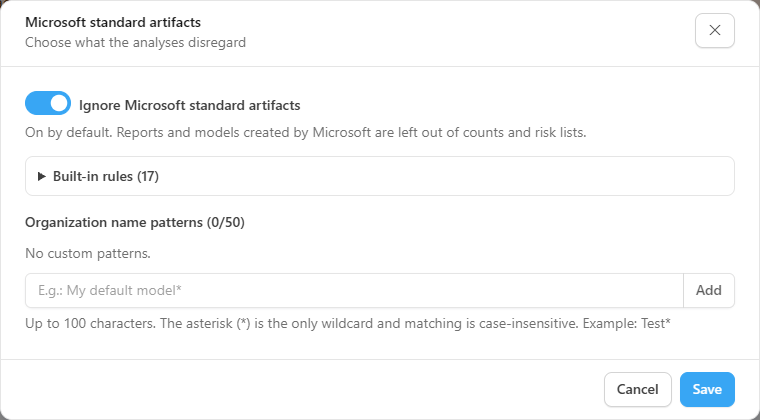
Administrators also see the **Configure** button, which opens the **Microsoft standard artifacts** window:
Microsoft standard artifacts window
| Item | What it does |
| --------------------------------------------------------------- | -------------------------------------------------------------------------------------------------------------------------------------------------------------------------------------------------------------------------------------------------------------------------- |
| **Ignore Microsoft standard artifacts** | Switch **on by default**. When off, Microsoft reports and models return to the counts and risk lists and are analyzed as if they were part of your business |
| **Built-in rules** (**Structural rules** and **Name patterns**) | Read-only: the workspace type (such as *Admin monitoring* and personal workspaces), the model provider (usage metrics models), the configured Capacity Metrics source and known Microsoft names |
| **Organization name patterns** | Up to 50 patterns of up to 100 characters, each with a remove button; type the pattern and click **Add** (or press Enter). Empty, repeated or asterisk-only patterns are not accepted. The asterisk (`*`) is the only wildcard and matching ignores case. Example: `Test*` |
With the switch off, the window warns that Microsoft reports and models appear again in the counts and risk lists. The **Built-in rules** sit in a collapsed section, with the count in parentheses. **Save** includes a pattern that was typed but not yet added, and **Cancel** closes without changing anything. On saving, the screen reloads the numbers.
## Frequently asked questions
Does Power Monitor read the content of my tables to find personal data?
No. Only column names, together with metadata already collected from the inventory and the activity log.
Does the Compliance posture score guarantee we are compliant with LGPD?
No. It is an internal indicator to prioritize actions, not a certification or legal advice.
A Microsoft report does not appear in the analyses. Is that wrong?
It is the default behavior: Microsoft standard artifacts are ignored. An Administrator can turn this rule off with **Configure** on the notice of the analysis screens.
## Related pages
* [Compliance](/en/power-monitor/governanca/conformidade.md): Governance menu group
* [Personal data discovery](/en/power-monitor/governanca/conformidade/descoberta-de-dados-pessoais.md)
* [Privacy risks](/en/power-monitor/governanca/conformidade/riscos-de-privacidade.md)
* [Compliance posture](/en/power-monitor/governanca/conformidade/postura-de-conformidade.md)
* [Access reviews](/en/power-monitor/governanca/conformidade/revisoes-de-acesso.md)
* [Behavioral risk](/en/power-monitor/auditoria/risco-comportamental.md)
* [Permission history](/en/power-monitor/auditoria/historico-de-permissoes.md)
---
# Agent Instructions
This documentation is published with GitBook. GitBook is the documentation platform designed so that both humans and AI agents can read, navigate, and reason over technical content effectively. Learn more at gitbook.com.
## Querying This Documentation
If you need additional information that is not directly available in this page, you can query the documentation by asking a question.
Perform an HTTP GET request on the following URL with the `ask` and `goal` query parameters:
```
GET https://docs.powermonitor.com.br/en/power-monitor/governanca/conformidade/privacidade-e-conformidade.md?ask=&goal=
```
`ask` is the immediate question: it should be specific, self-contained, and written in natural language.
`goal` is what the user is ultimately trying to achieve, the reason they need the answer. Sharing it helps GitBook give you a better, more relevant answer. A goal is most helpful when it describes the outcome the user wants rather than restating the question. For example, with `ask=how do I create an API token`, a goal like `automate deployments from our CI pipeline` lets GitBook tailor the answer to that use case.
The response will contain a direct answer to the question and relevant excerpts and sources from the documentation.
Use this mechanism when the answer is not explicitly present in the current page, you need clarification or additional context, or you want to retrieve related documentation sections.