> For the complete documentation index, see [llms.txt](https://docs.powermonitor.com.br/llms.txt). Markdown versions of documentation pages are available by appending `.md` to page URLs; this page is available as [Markdown](https://docs.powermonitor.com.br/en/power-monitor/governanca/conformidade/riscos-de-privacidade.md).
# Privacy risks
Cross semantic models that have personal data candidates with label, RLS, exposure, exports, access origin and lack of use, in six risk cross-cuts. Decision support, not legal advice.
The **Privacy risks** screen takes the semantic models with **personal data candidates** (see [Personal data discovery](/en/power-monitor/governanca/conformidade/descoberta-de-dados-pessoais.md)) and crosses them with other signals from the environment in **six risk cross-cuts**: missing sensitivity label, missing RLS, exposure, exports, access from other countries and idle data. The goal is to answer "among the models with possible personal data, which deserves attention first?".
**How to access:** menu *Governance › Compliance › Privacy risks*, or the **View privacy risks** button on the discovery screen.
**Who can use it:** all profiles can see the screen, within their **workspace scope** (the notice *You only see the workspaces in your scope. The numbers reflect only that slice.* appears). The **Privacy settings** button is for **Administrators**. Access control is the same as for [Personal data discovery](/en/power-monitor/governanca/conformidade/descoberta-de-dados-pessoais.md): blocking one of the two pages for a user in [Users](/en/power-monitor/usuarios.md) blocks both.
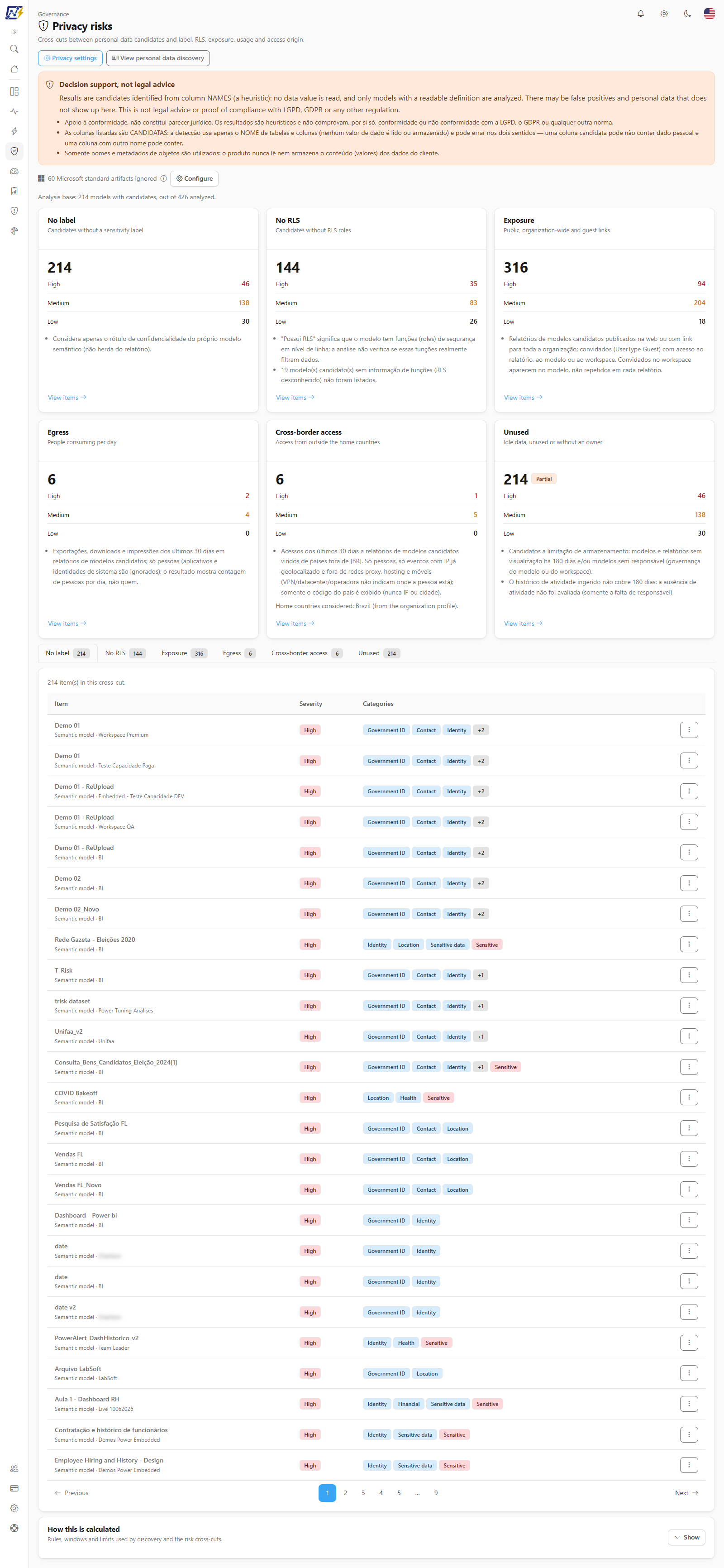
Governance › Compliance › Privacy risks
{% hint style="warning" %}
**Decision support, not legal advice.** The cross-cuts depend on candidates identified from column names and on data that Power Monitor already collects. Confirm each case before acting; the screen does not prove compliance or non-compliance.
{% endhint %}
## What it is for
* **Prioritize** the handling of personal data: a candidate model with no label, no RLS and published to the web is far more urgent than the rest.
* **Detect exposure** (public links, organization-wide links and guests) of reports that use models with possible personal data.
* **Watch data leaving** (export, download, print) and **access from outside the expected countries**.
* **Find idle data**, unused or without an owner, which goes against minimization and storage limitation.
## Screen components
1. **Header** with **Privacy settings** (for other profiles the button is dimmed, with the tip *Only administrators can manage the dictionary and the privacy settings.*) and **View personal data discovery**. This screen has no **Hide data** button: it shows only counts and item names, never people's names.
2. **"Decision support, not legal advice" notice** and, if any, the notice about [Microsoft standard artifacts](/en/power-monitor/governanca/conformidade/privacidade-e-conformidade.md#microsoft-standard-artifacts-are-left-out) being ignored.
3. **Analysis base** (*N models with candidates, out of M analyzed*).
4. **Six cross-cut cards**, each with the cross-cut subtitle, the total, the count by severity (**High**, **Medium** and **Low**) and the **View items** link, which opens the matching tab. When the cross-cut is not complete, the card shows the **Partial** or **Unavailable** badge and the server notes.
5. **Tabs by risk type** (one item list per cross-cut, with the total of each cross-cut in the counter).
6. **How this is calculated**, a collapsible card with the methodology.
### The six cross-cuts
| Cross-cut | What it counts | Window |
| ------------------------------------------------------------------ | ----------------------------------------------------------------------------------------------------------------------------------------------- | ------------- |
| **No label** (*Candidates without a sensitivity label*) | Model with a medium or high confidence candidate and no sensitivity label | Current state |
| **No RLS** (*Candidates without RLS roles*) | Candidate model whose RLS roles are known and are zero. A model with unknown roles is not counted: unknown is not "no RLS" | Current state |
| **Exposure** (*Public, organization-wide and guest links*) | Report of a candidate model published to the web or with an organization-wide link; guest with access to the report, the model or the workspace | Current state |
| **Egress** (*People consuming per day*) | Export, download or print events on reports of candidate models, counted in **distinct people per day** | Last 30 days |
| **Cross-border access** (*Access from outside the home countries*) | Report views of candidate models by people from countries outside the home country list | Last 30 days |
| **Unused** (*Idle data, unused or without an owner*) | Candidate model with no report view for 180 days and/or no owner; report of a candidate model with no view for 180 days | Last 180 days |
#### Severity
The base severity of each item depends on what the model contains: **High** when there is a special-category candidate (health, biometric and other sensitive) or a high-confidence government ID; **Medium** when there is another high-confidence candidate; **Low** otherwise. Some cross-cuts raise one level:
* **Exposure:** published to the web is always **High**; an organization-wide link goes up one level; guests keep the base severity.
* **Egress:** goes up one level when 5 or more distinct people act on the same day.
* **Cross-border access:** goes up one level with 3 or more distinct people from outside.
* **Unused:** goes up one level when the model has no activity **and** no owner.
#### Cross-cut status: Complete, Partial or Unavailable
Each card may show a badge:
| Badge | Meaning |
| ------------------------ | -------------------------------------------------------------------------------- |
| *(none)* or **Complete** | All sources were read |
| **Partial** | A source is missing or was cut: the numbers are a **floor** (they may be higher) |
| **Unavailable** | There is no data for this cross-cut; the note explains why |
### Cross-border access
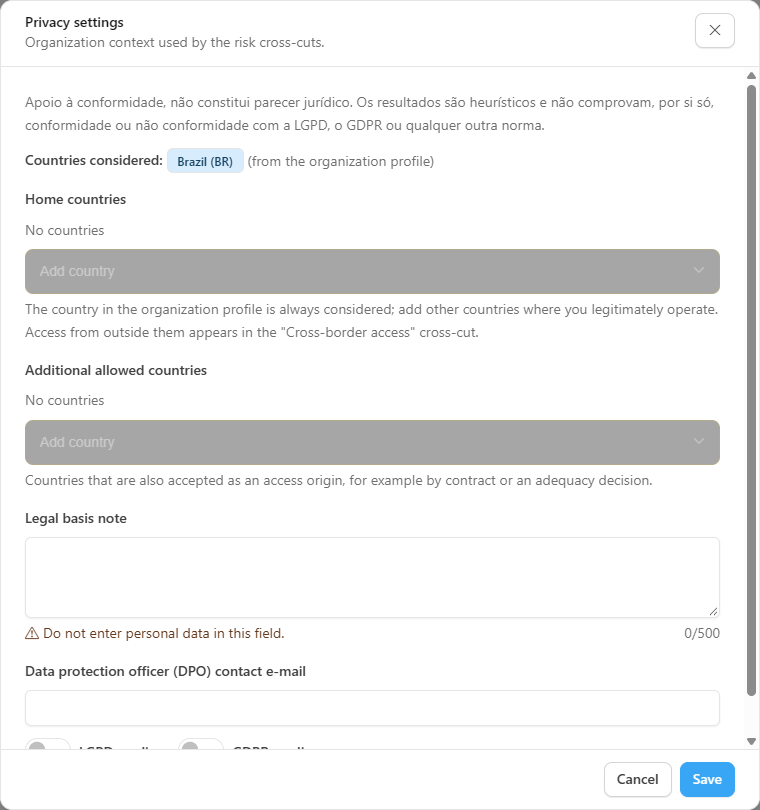
This cross-cut only works when there is a list of **home countries**. Power Monitor uses the country in the organization profile and the countries an Administrator enters in **Privacy settings** (see [Personal data discovery](/en/power-monitor/governanca/conformidade/descoberta-de-dados-pessoais.md#privacy-settings-administrator)). With no country, the cross-cut is **Unavailable** and the card shows the **Configure home countries** button (for Administrators) or the guidance *Ask an administrator to enter the home countries in "Privacy settings".*
Privacy settings: home countries
Important details:
* Only events whose IP has already been geolocated and does **not** belong to proxy, hosting (datacenter) or mobile carrier networks are included. VPN and datacenter addresses, therefore, do not indicate where the person really is.
* Only **people** are considered; applications, Service Principals and access through Power BI Embedded are ignored.
* The screen shows only the **country code**, never the IP or the city.
* The card shows *Home countries considered: ... (defined in the settings / from the organization profile)*.
### Tabs and item list
Each tab corresponds to a cross-cut and carries a counter. On narrow screens the tabs become a drop-down list. Every tab has the columns **Item** (name, type, *Semantic model* or *Report*, and workspace), **Severity** and **Categories** of the candidates (up to three badges and a *+N* counter for the rest; sensitive ones carry the **Sensitive** badge). Each tab adds a column of its own:
| Tab | Specific column |
| --------------------------- | -------------------------------------------------------------------------------------------------------------------------------------------------------------------------------------------------------------------- |
| **No label** and **No RLS** | None besides the common ones |
| **Exposure** | **Exposure**: **Published to the web**, **Organization-wide link** and **Guests: N** |
| **Egress** | **People per day**: a mini chart (each bar is a day, and the tip shows the date and the number of people), the peak (*Peak: N/day*) and the total events. It shows **people counts**, never the list of who exported |
| **Cross-border access** | **Countries** of origin of the access, in the format *Country: N* (number of people; up to five countries, and *+N* for the rest) |
| **Unused** | **Usage**: *No activity in the window*, *N days unused*, *No owner* or *Usage not evaluated* |
Above the table you see the count *N item(s) in this cross-cut.* With no items, the message is *No items in this cross-cut.* The list is paginated (25 by default) and has the **Items per page** selector (10, 25, 50 or 100). The columns are not sortable.
When the cross-cut is **Partial** or **Unavailable**, a notice above the table shows the badge, the explanation (*A source is missing or was cut: the numbers are a floor.* or *No data for this cross-cut. See the note below.*) and the cross-cut notes; in the **Unavailable** state the table is not shown.
The **More actions** menu of each row (or right-click) offers **Open in Power BI** (dimmed, with the tip *There are not enough identifiers to open this item in Power BI.*, when identifiers are missing) and **Copy name**.
### How this is calculated
The collapsible **How this is calculated** card (*Rules, windows and limits used by the discovery and the risk cross-cuts*), which starts closed (**Show** / **Hide** button) and loads its content only on the first opening, gathers:
* the **methodology version** and the server notice;
* the **heuristics** (how the column name is compared with the dictionary) and **What is not used** (data values, DAX and M expressions, RLS filters, table and measure names);
* the **categories** with the number of built-in terms and examples;
* the **confidence** levels;
* the rule of each **risk cross-cut**;
* the **limits**: at most 20,000 models, 50,000 reports, 500 candidates per model, 100,000 activity rows, 30-day egress and cross-border windows, a 180-day unused window and a 300-second cache.
## Rules and behavior
* The **No label**, **No RLS** and **Exposure** cross-cuts reflect the **current state** of the inventory (last scan); public and organization-wide links are read live from the admin API, with a 5-minute cache. **Egress**, **Cross-border access** and **Unused** use the Power BI/Fabric activity log.
* In the **Unused** cross-cut, absence of activity is only stated when the log history covers the whole 180-day window; otherwise only the lack of an owner is evaluated and the cross-cut shows as **Partial**. Use outside reports (for example, Analyze in Excel) is not seen by the analysis.
* The label considered is the model's own; a label inherited from the report is not evaluated.
* **Microsoft standard artifacts** are not counted.
* The screen is read-only: Power Monitor does not change labels, RLS or links.
## Step by step
### How to investigate an exposed model
{% stepper %}
{% step %}
### Start with exposure
Open *Governance › Compliance › Privacy risks* and, on the **Exposure** card, click **View items**.
{% endstep %}
{% step %}
### Order your attention
Look for items with **High** severity and the **Published to the web** badge.
{% endstep %}
{% step %}
### Check the content
Use **Open in Power BI** to validate the report and, in [Personal data discovery](/en/power-monitor/governanca/conformidade/descoberta-de-dados-pessoais.md), the model's candidate columns.
{% endstep %}
{% step %}
### Fix it at the source
Remove the public link or restrict sharing in Power BI. See also [Public Links](/en/power-monitor/governanca/conformidade/links-publicos.md) and [Organization-wide Links](/en/power-monitor/governanca/conformidade/links-para-toda-a-organizacao.md).
{% endstep %}
{% endstepper %}
### How to enable the cross-border access cross-cut (Administrator)
1. Click **Privacy settings**.
2. Under **Home countries**, add the countries where the organization operates.
3. If there are countries accepted by contract or adequacy decision, add them to **Additional allowed countries**.
4. Save. The cross-cut starts being calculated.
## Frequently asked questions
A cross-cut shows as "Partial". Can I trust the numbers?
Treat them as a floor: the real amount may be higher, because a source was missing or was cut by a limit. The note on the card explains which source was missing.
The "Cross-border access" cross-cut is unavailable.
No home country is defined. An Administrator must enter the countries in **Privacy settings** (or complete the organization profile).
Does Egress show who exported?
No. It shows the number of people per day, never the list of who exported.
A model without RLS shows as "RLS unknown".
Power Monitor has not yet been able to read the model's RLS roles (for lack of a capture or a readable definition). Unknown is not treated as "no RLS" in the cross-cuts.
## Related pages
* [Privacy and compliance](/en/power-monitor/governanca/conformidade/privacidade-e-conformidade.md)
* [Personal data discovery](/en/power-monitor/governanca/conformidade/descoberta-de-dados-pessoais.md)
* [Compliance posture](/en/power-monitor/governanca/conformidade/postura-de-conformidade.md)
* [Public Links](/en/power-monitor/governanca/conformidade/links-publicos.md)
* [Organization-wide Links](/en/power-monitor/governanca/conformidade/links-para-toda-a-organizacao.md)
* [Row-Level Security](/en/power-monitor/auditoria/seguranca-em-nivel-de-linha.md)
---
# Agent Instructions
This documentation is published with GitBook. GitBook is the documentation platform designed so that both humans and AI agents can read, navigate, and reason over technical content effectively. Learn more at gitbook.com.
## Querying This Documentation
If you need additional information that is not directly available in this page, you can query the documentation by asking a question.
Perform an HTTP GET request on the following URL with the `ask` and `goal` query parameters:
```
GET https://docs.powermonitor.com.br/en/power-monitor/governanca/conformidade/riscos-de-privacidade.md?ask=&goal=
```
`ask` is the immediate question: it should be specific, self-contained, and written in natural language.
`goal` is what the user is ultimately trying to achieve, the reason they need the answer. Sharing it helps GitBook give you a better, more relevant answer. A goal is most helpful when it describes the outcome the user wants rather than restating the question. For example, with `ask=how do I create an API token`, a goal like `automate deployments from our CI pipeline` lets GitBook tailor the answer to that use case.
The response will contain a direct answer to the question and relevant excerpts and sources from the documentation.
Use this mechanism when the answer is not explicitly present in the current page, you need clarification or additional context, or you want to retrieve related documentation sections.