# Azure Quotas
The **Azure Quotas** collection reads in Azure, for each subscription and region where your organization has Fabric capacities, the **limit** and the **current usage of Capacity Units (CU)** of Microsoft Fabric. The list of quotas and the usage indicators are in Governance; this screen shows the collection history and lets you trigger or pause it.
**How to access:** *Mapping › Capacity and cost › Azure Quotas*. Only **Administrators** can access the screen and the actions. On the data screen, all profiles see the **Collection** line with the date of the last run; the **View/manage collection →** link, which leads here, appears only for administrators.
Azure Quotas
## What it is for
* Keep up to date the numbers in [Governance › Infrastructure › Azure Quotas](../governanca/azure-quotas.md), used to plan new capacities and SKU increases before hitting the region's quota.
* Refresh the quotas right away, for example just after creating or resizing a capacity.
* Confirm that the collection is running and investigate subscription and region combinations that could not be queried.
## Screen components
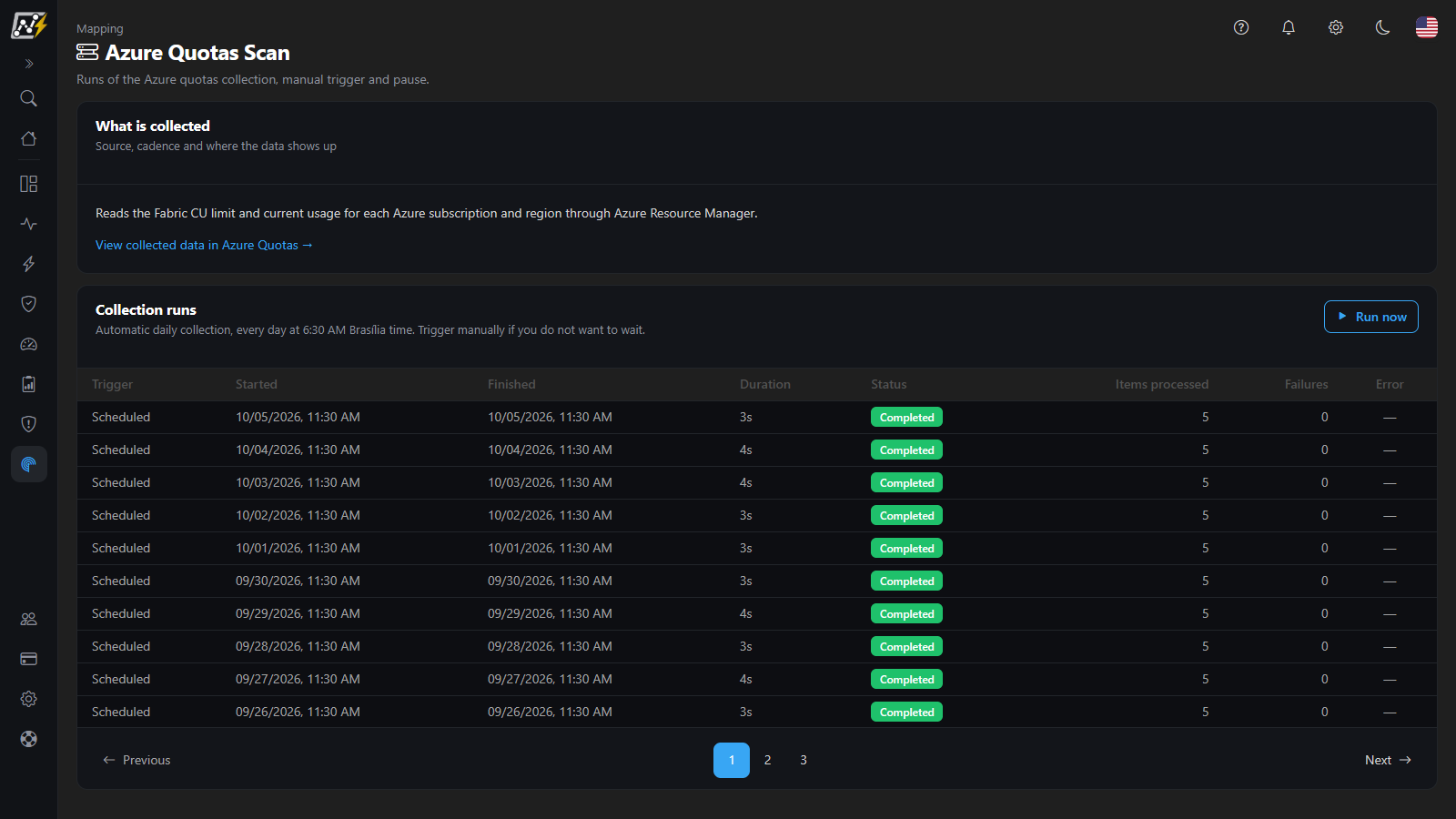
The screen has a header (*Mapping* and the collection subtitle) and two cards.
### What is collected card
Describes the source and the cadence (*Source, cadence and where the data shows up*) and has, at the bottom, the **View collected data in Azure Quotas →** link, which leads to the data screen.
### Collection runs card
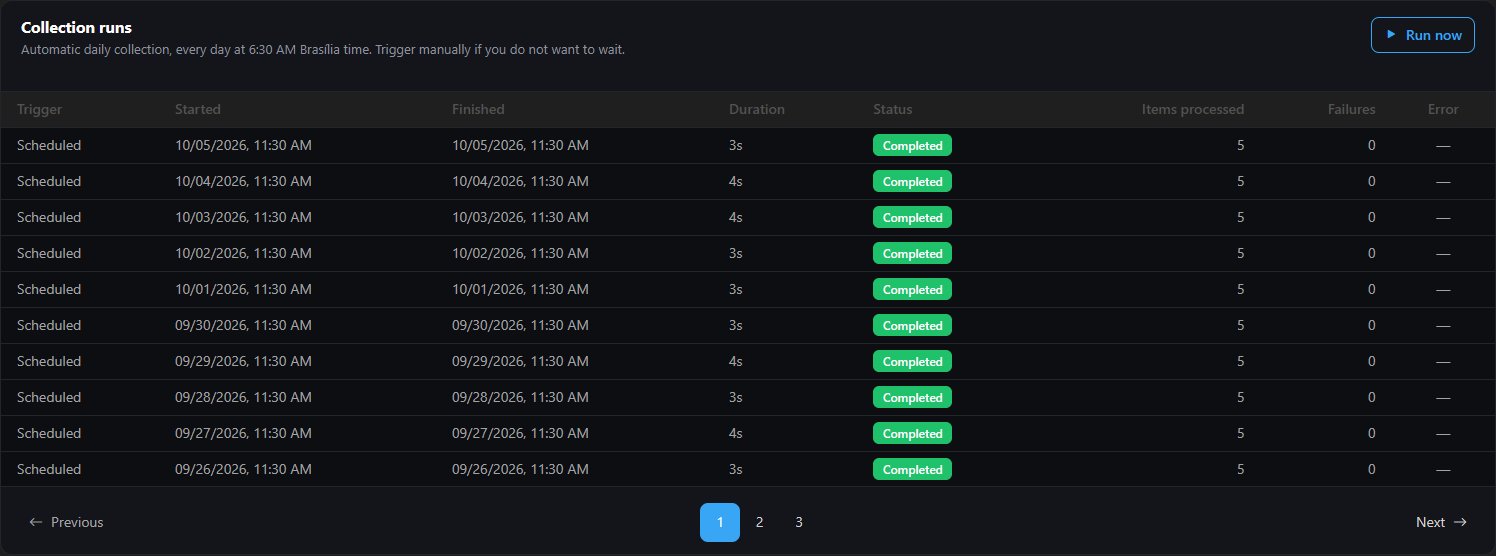
The **Collection runs** card (*Automatic daily collection, every day at 6:30 AM Brasília time. Trigger manually if you do not want to wait.*) holds the buttons and the history.
Quota collection runs
| Element | What it is for |
| --- | --- |
| **Run now** / **Resume** | Triggers a manual collection. When there is a **Paused** run, the button is renamed **Resume** and continues from the combination where it stopped. It works even with the automatic collection turned off. |
| **Pause** | Appears only during a run in progress. The pause is cooperative: the notice **Pause requested: the run stops after the next processed item** appears and the run becomes **Paused** when it finishes the current combination. |
| State badges | **Run in progress (n)** (with a progress bar), **Run paused** and, if automatic tracking ends, **Automatic refresh stopped. Reload the page to see the current status.** |
| Runs table | History from the most recent to the oldest, with an items-per-page selector and pagination. |
| **View failures** | Link in the **Failures** column that opens the **Failures for the {date} run** modal, with **Item**, **Reason** and **Detail**. |
Table columns:
| Column | Content |
| --- | --- |
| **Trigger** | **Scheduled** or **Manual** (for manual runs, hover over the person icon to see who triggered it) |
| **Started** / **Finished** / **Duration** | Run times (no end and duration while it is active) |
| **Status** | **Running**, **Paused**, **Completed**, **Failed** or **Stuck** |
| **Items processed** | Subscription and region combinations already covered by the run (including those that failed) |
| **Failures** | Combinations that could not be queried; **View failures** link |
| **Error** | Icon with the run's general error message (hover over it) |
## Rules and behavior
* **Where the data comes from:** Azure management API (usage and limit of the Microsoft Fabric provider quotas), queried with the organization's Service Principal.
* **Where the combinations come from:** the organization's Fabric capacities that already have their **Azure subscription identified** (see [Sync with Azure](../governanca/capacidades.md#sync-with-azure)). For each subscription and region of these capacities, the collection queries the quotas. Capacities without an identified subscription do not generate rows.
* **Required permission:** the Service Principal needs at least the **Reader** role on the capacities' subscriptions (the same one required by **Sync with Azure**).
* **Frequency:** daily, at **06:30** (Brasília time, UTC-3), for organizations with a Service Principal configured. In [Settings › Monitoring](../configuracoes/monitoramento.md#scans-and-collections), **Scans and Collections** section, **Others** group, **Azure Capacity Units Quotas** item, you can turn the collection off (it is on by default) and choose the **Frequency**: **Daily**, **Weekly** or **Monthly**. With the weekly and monthly options, the run happens on a day distributed per organization, and the item shows **Next expected run** and **Last run**. **Run now** is never affected: it works with the switch turned off and at any frequency.
* **A failure on one combination does not bring the collection down:** the combination that failed is counted in **Failures** and its previous numbers are kept.
* **Stuck:** a run with no progress for **10 minutes** is closed as **Stuck**.
* **Concurrency:** there is only one active run (in progress or paused) per organization. When you try to trigger another one, *A run is already in progress for this organization.* appears.
* **Screen refresh:** while there is an active run, the table refreshes by itself every 20 seconds, for up to 30 minutes.
## Step by step
{% stepper %}
{% step %}
### Open the collection screen
Go to *Mapping › Capacity and cost › Azure Quotas* with an administrator account.
{% endstep %}
{% step %}
### Trigger the collection
In the **Collection runs** card, click **Run now**. There is no confirmation; the button shows **Running…** and the message *Run queued. The history updates when it starts.* appears. While the collection service has not picked up the run, the button shows **Queued** and the card says *Run queued, waiting to start…*; then the button changes to **In progress** and the bar shows the processed items (for example, *12 of 40*) and the estimated time left (*~3 min left*). The screen tracks the run until it finishes, without reloading.
{% endstep %}
{% step %}
### Follow it
Watch the **Run in progress** badge and the new row in the history. If you need to stop it, click **Pause**; later use **Resume** to continue from the combination where it stopped.
{% endstep %}
{% step %}
### Confirm the result
When the run shows as **Completed**, open [Governance › Infrastructure › Azure Quotas](../governanca/azure-quotas.md) through the link in the **What is collected** card and check the numbers.
{% endstep %}
{% endstepper %}
## Frequently asked questions
The run failed with a message saying it could not acquire the Azure management token.
The Service Principal is missing or invalid (the message is shown in Portuguese). Review the credentials in [Settings](../configuracoes.md) and click **Run now** again.
A subscription or region does not appear in the list of quotas.
The combinations come from the capacities that already have the Azure subscription identified. In *Governance › Infrastructure › Capacities*, use **Sync with Azure** (requires Administrator), check that the Service Principal has the **Reader** role on the subscription and click **Run now** here.
Some combinations appear in Failures.
Click **View failures** to read the reason for each one. An isolated Azure API failure usually goes away in the next run; repeated failures on one subscription usually indicate a missing **Reader** role.
## Related pages
* [Governance › Infrastructure › Azure Quotas](../governanca/azure-quotas.md)
* [Governance › Infrastructure › Capacities](../governanca/capacidades.md)
* [Settings › Monitoring](../configuracoes/monitoramento.md)
* [Mapping](README.md)