# Workspace Git
The Mapping **Workspace Git** screen controls the collection that reads, for each monitored workspace, **whether it is connected to a Git repository** and **how many items diverge from the branch**: with changes not yet committed, behind the branch or in conflict. The list and the indicators are in Governance; this screen shows the collection history and lets you trigger, pause and resume it.
**How to access:** *Mapping › Operations › Workspace Git*. Only **Administrators** can access the screen and the actions. On the Workspace Git screen in Governance, the other profiles see only the **Collection** status line, without the link to this screen.
Workspace Git
## What it is for
* Confirm that the Git status of workspaces is being collected every 6 hours and whether the last collection finished well.
* Update the status right away, after connecting a workspace to Git, making a commit or resolving a conflict.
* Find out how many workspaces the collection could not read and why.
## Screen components
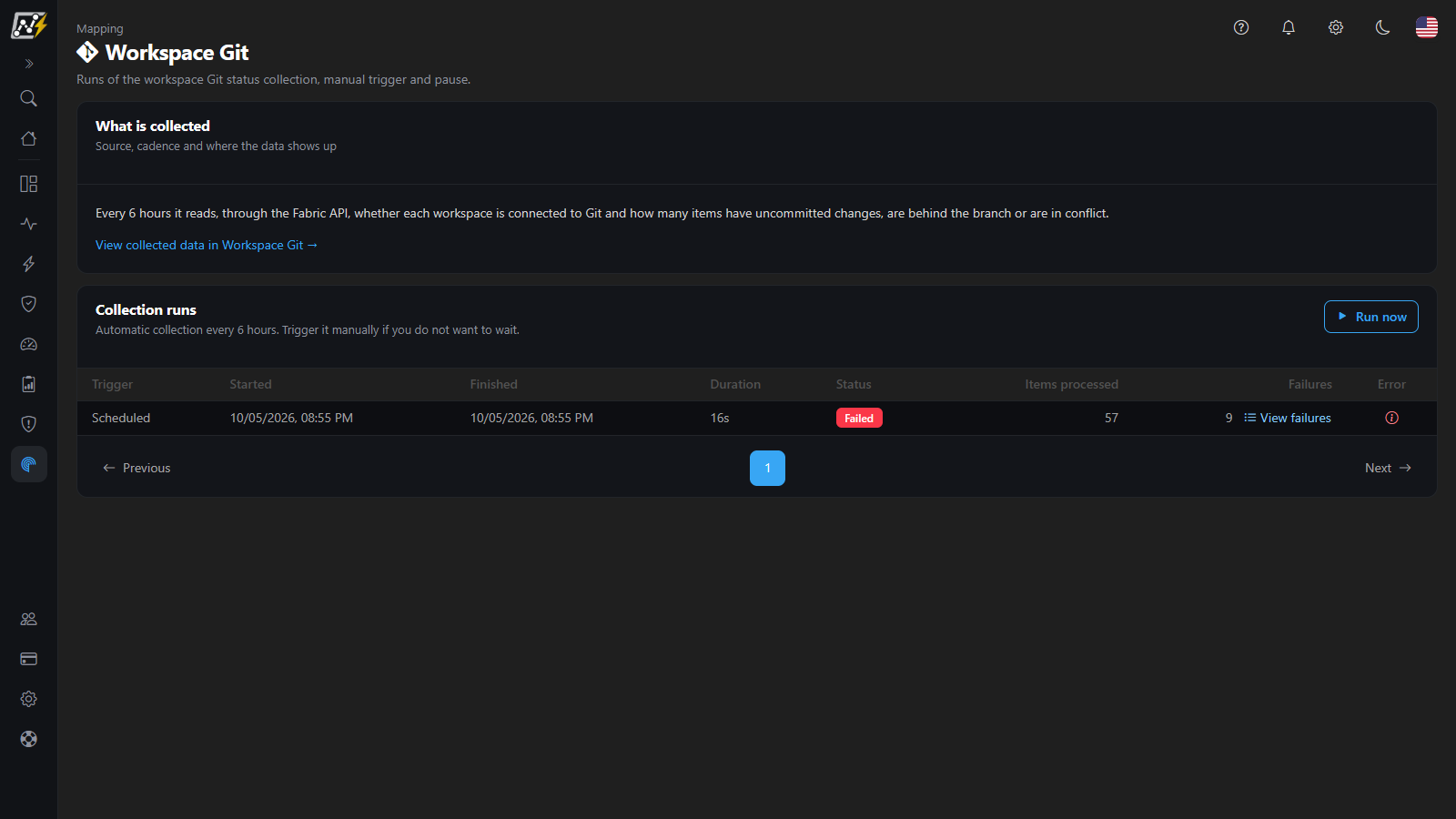
The screen has two cards: **What is collected** and **Collection runs** ("Automatic collection every 6 hours. Trigger it manually if you do not want to wait.").
### What is collected
**What it is:** a card with the description of the collection and, in the footer, the link **View collected data in Workspace Git →**, which leads to the Governance screen.
### Run now / Resume
**What it is:** a button that triggers a manual collection. When there is a **Paused** collection, the same button is named **Resume** and continues where it stopped.
**What it is for:** reflecting right away, in [Governance › Operations › Workspace Git](../governanca/git-dos-workspaces.md), the current situation of the workspaces.
**How to use:**
1. Click **Run now**. There is no confirmation modal; the button shows **Running…** while it sends the request.
2. The message **Run queued. The history updates when it starts.** confirms it; if a collection is already running, **A run is already in progress for this organization.** appears. While the collection service has not picked up the run, the button shows **Queued** and the card says *Run queued, waiting to start…*; then the button changes to **In progress** and the bar shows the processed items (for example, *12 of 40*) and the estimated time left (*~3 min left*). The screen tracks the run until it finishes, without reloading.
3. Follow the **Run in progress** badge and the row in the history until **Completed**.
To resume a paused collection, click **Resume** (**Resuming…**). The message **Run resumed successfully.** confirms it.
**How it works / rules:**
* It works even with the automatic run turned off.
* There is only one active collection (running or paused) per organization.
### Pause
**What it is:** a button that appears only while a collection is running and asks it to stop.
**What it is for:** temporarily interrupting a long collection, for example in organizations with many workspaces, without losing what has already been read.
**How to use:**
1. During the collection, click **Pause** (**Pausing…**). The badge **Pause requested: the run stops after the next processed item** appears.
2. The run becomes **Paused** and the main button becomes **Resume**.
3. Click **Resume** to continue from where it stopped.
**How it works / rules:** the pause is cooperative: the workspace being processed finishes and the collection stops at the next one. A paused collection does not expire. When resumed, only the workspaces not yet checked in the run are read.
### Collection state badges
At the top of the card the badges **Run in progress (n)** (blue, with a spinning indicator), **Run paused** (yellow) and **Pause requested…** (gray) appear. During a running collection, an animated progress bar appears above the table. If the automatic refresh of the screen is stopped after a long time, **Automatic refresh stopped. Reload the page to see the current status.** appears.
### Run history
**What it is:** a paginated table (10 per page; the **Items per page** selector below the table offers 10, 25, 50 or 100) with the runs, from the most recent to the oldest.
Run history
| Column | Content |
| --- | --- |
| **Trigger** | **Scheduled** or **Manual** (in manual runs, hover over the person icon to see who triggered it) |
| **Started** / **Finished** / **Duration** | Times of the run (no end or duration while it is active) |
| **Status** | **Running** (blue), **Paused** (yellow), **Completed** (green), **Failed** (red), **Stuck** (yellow) |
| **Items processed** | Number of workspaces read |
| **Failures** | Workspaces with an error; **View failures** link |
| **Error** | Icon with the general error message of the run (hover over it) |
While there is an active collection, the table refreshes automatically every 20 seconds. With no runs, **No run recorded yet** appears.
### View failures
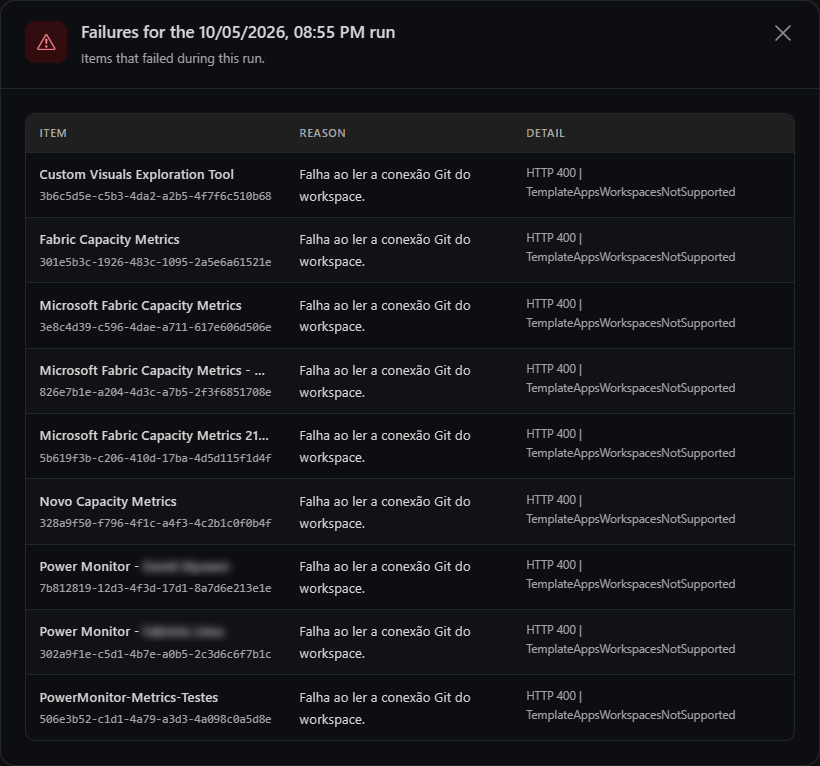
**What it is:** a link in the **Failures** column that opens the **Failures for the {date} run** modal, with the columns **Item** (workspace name and identifier), **Reason** and **Detail**.
Failures for the run
**How to use:** click **View failures** in the run (available when it ended with failures), read the **Reason** and **Detail** of each workspace and click **Close**. If the run did not keep the detail, **No detail available for this run.** appears. When there are many failures, the end of the list shows **and n more not listed**.
## Rules and behavior
* **Where the data comes from:** Fabric API (Git connection and Git status of each workspace), with the organization's Service Principal.
* **Automatic frequency:** every **6 hours** (at 03:55, 09:55, 15:55 and 21:55, Brasília time), for active organizations with a configured Service Principal. It can be turned off in *Settings › Monitoring › Scans and Collections*, **Others** group (**Workspace Git status**). Because it runs several times a day, this scan **does not have the Frequency option** (**Daily**/**Weekly**/**Monthly**). **Run now** works even with the switch turned off.
* **Which workspaces are read:** the **monitored** workspaces that are active and not deleted.
* **Counts of items, not commits:** the numbers are of workspace **items**. Fabric does not report the number of commits.
* **Result per workspace:** each workspace ends as **Read**, **No Git** (not connected to a repository), **Unavailable** or **Error**. **Unavailable** is not a failure: it happens, for example, when the Service Principal cannot see the workspace, the workspace is not in a capacity or Fabric requires the caller's own Git credentials, which a Service Principal usually does not have. Only **Error** counts in the **Failures** column.
* **Request limit:** if Fabric answers that the request limit was reached (429), the run ends as **Failed** with the message of the point where it stopped, what was already read is kept and the next collection starts with the least recently read workspaces.
* **Stuck:** a collection with no progress for **10 minutes** is ended as **Stuck**.
* **Concurrency:** one active collection (running or paused) per organization.
### Required permissions
The Service Principal must be in the workspace with the **Contributor** role or higher for Fabric to return the Git connection and status. Workspaces where it has no access appear as **Unavailable** on the Governance screen.
## Step by step
{% stepper %}
{% step %}
### Open the screen
In *Mapping › Operations › Workspace Git* (or through the **View/manage collection →** link on the Governance screen).
{% endstep %}
{% step %}
### Trigger the collection
Click **Run now** and follow the **Run in progress** badge until the history row is **Completed**.
{% endstep %}
{% step %}
### Check the failures
If the **Failures** column is greater than zero, click **View failures** and read the **Reason** and **Detail**.
{% endstep %}
{% step %}
### See the data
Click **View collected data in Workspace Git →** to open the list in Governance.
{% endstep %}
{% endstepper %}
## Common errors and how to fix them
| Message / symptom | How to fix |
| --- | --- |
| **Failed** status with a request limit (429) message | Wait and click **Run now** again; the collection continues with the least recently read workspaces. |
| Workspaces **Unavailable** in Governance | It is not a failure. Add the Service Principal to the workspace (Contributor or higher) if you want to read the status. |
| **Stuck** status | The run stopped progressing. Click **Run now** again. |
| **Service Principal not configured** | Complete the Service Principal configuration in *Settings*. |
## Frequently asked questions
Where do I see the Git status of each workspace?
In [Governance › Operations › Workspace Git](../governanca/git-dos-workspaces.md), available to all profiles (respecting each user's workspace scope). This screen shows only the runs of the collection.
None of my workspaces use Git. Do I need this collection?
No. Workspaces without Git stay as **No Git**. If you prefer, turn the collection off in *Settings › Monitoring › Scans and Collections*.
Why is the count of changes in items and not commits?
Because the Fabric API does not report commits: it lists the items whose content differs between the workspace and the branch.
## Related pages
* [Governance › Operations › Workspace Git](../governanca/git-dos-workspaces.md)
* [Governance › Workspaces](../governanca/workspaces.md)
* [Settings › Monitoring](../configuracoes/monitoramento.md)
* [Scan Logs](logs-de-scans-e-re-execucoes.md)
* [Mapping](README.md)