> For the complete documentation index, see [llms.txt](https://docs.powermonitor.com.br/llms.txt). Markdown versions of documentation pages are available by appending `.md` to page URLs; this page is available as [Markdown](https://docs.powermonitor.com.br/en/power-monitor/qualidade-de-dados/score-de-boas-praticas-bpa.md).

# Best Practices Score

Assess a semantic model against 55 best practice rules (Tabular Editor BPA, Microsoft guidelines and Power Monitor heuristics), with severity, target, recommendation, rule source and analysis coverage

The **Best Practices Score** checks whether a semantic model follows the modeling best practices of Tabular Editor's **Best Practice Analyzer (BPA)**, complemented by rules from **Microsoft's official guidelines** for Power BI and by well-known community recommendations. The result is a rating from 0 to 100, the rating of each category and the list of problems with the recommended fix.

**How to access:** *Data Quality › Best Practices Score*. Available to all profiles (read-only), unless access to the page is blocked: the predefined **Audit** profile does not open this screen by default, and an administrator can allow or block it per profile or per user (see [Users](/en/power-monitor/usuarios.md#user-profiles)); the block also applies to the data. The same score appears on the **Best Practices Adherence** tab of the model details, on screens such as [Governance › Semantic Models](/en/power-monitor/governanca/modelos-semanticos.md).

<figure><picture><source srcset="/files/LpsTUT7G2HwhuyYYagR4" media="(prefers-color-scheme: dark)"><img src="https://3938213054-files.gitbook.io/~/files/v0/b/gitbook-x-prod.appspot.com/o/spaces%2FH2bFRBmIfyK3kwVKbldl%2Fuploads%2Fgit-blob-2b7daf197a32431acadb5c2d7eb2b4b136704ade%2Fpm-qualidade-score-boas-praticas-en.png?alt=media" alt="Best Practices Score screen with the overall score, category cards and findings table"></picture><figcaption><p>Overall score, categories and findings</p></figcaption></figure>

## What it is for

* **Reviewing models before they go to production** (modeling code review).
* **Standardizing** naming, formatting and data types across teams.
* **Performance**: finding floating point columns, unused hidden columns, bidirectional relationships and functions that prevent *query folding*.
* **Prioritizing technical debt** in critical models, using the rating and the severity.

## Features

The screen uses the same layout as the [AI Score](/en/power-monitor/qualidade-de-dados/score-de-ia.md), with the BPA's own rules and weights.

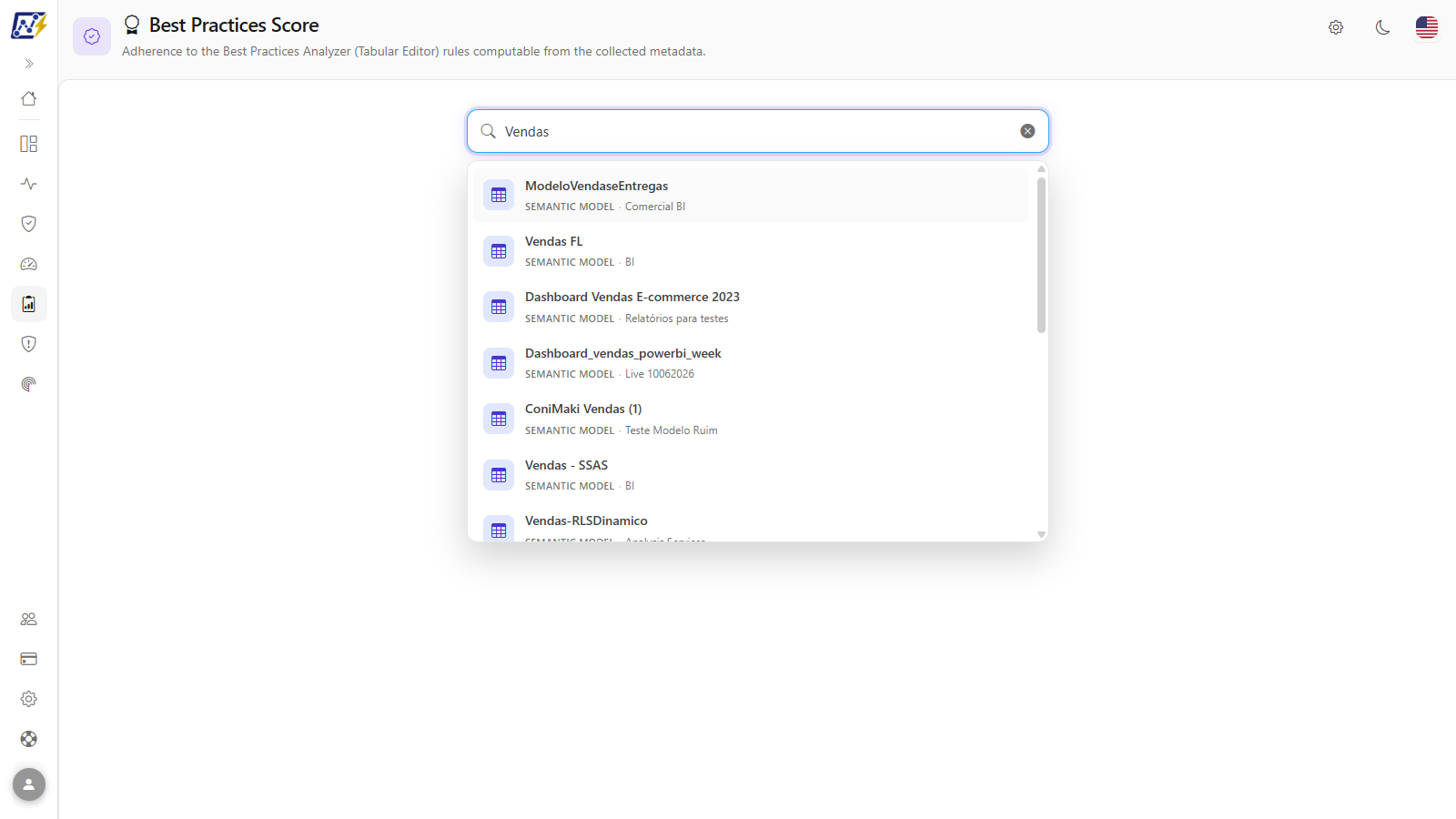
### Semantic model selection

**What it is:** the *Search semantic model...* field, at the top of the screen; only semantic models appear in the list, with the workspace of each one.

**What it is for:** choosing the model that will be reviewed.

<figure><picture><source srcset="/files/DNdAfI7kAgdGDxCH4eFF" media="(prefers-color-scheme: dark)"><img src="https://3938213054-files.gitbook.io/~/files/v0/b/gitbook-x-prod.appspot.com/o/spaces%2FH2bFRBmIfyK3kwVKbldl%2Fuploads%2Fgit-blob-253b35ba3903432f093cdc0bee832060d21cd976%2Fpm-qualidade-score-boas-praticas-selecao-en.png?alt=media" alt="Search semantic model field with the list of suggestions open"></picture><figcaption><p>Model search and selection</p></figcaption></figure>

**How to use:**

1. Type at least 2 characters in **Search semantic model...**.
2. Click the suggestion (or use **↑**/**↓** and **Enter**).
3. The bar below the search confirms the model and the workspace, with the reminder *the analysis uses metadata from the latest scan*, and the screen displays *Analyzing the model...*.

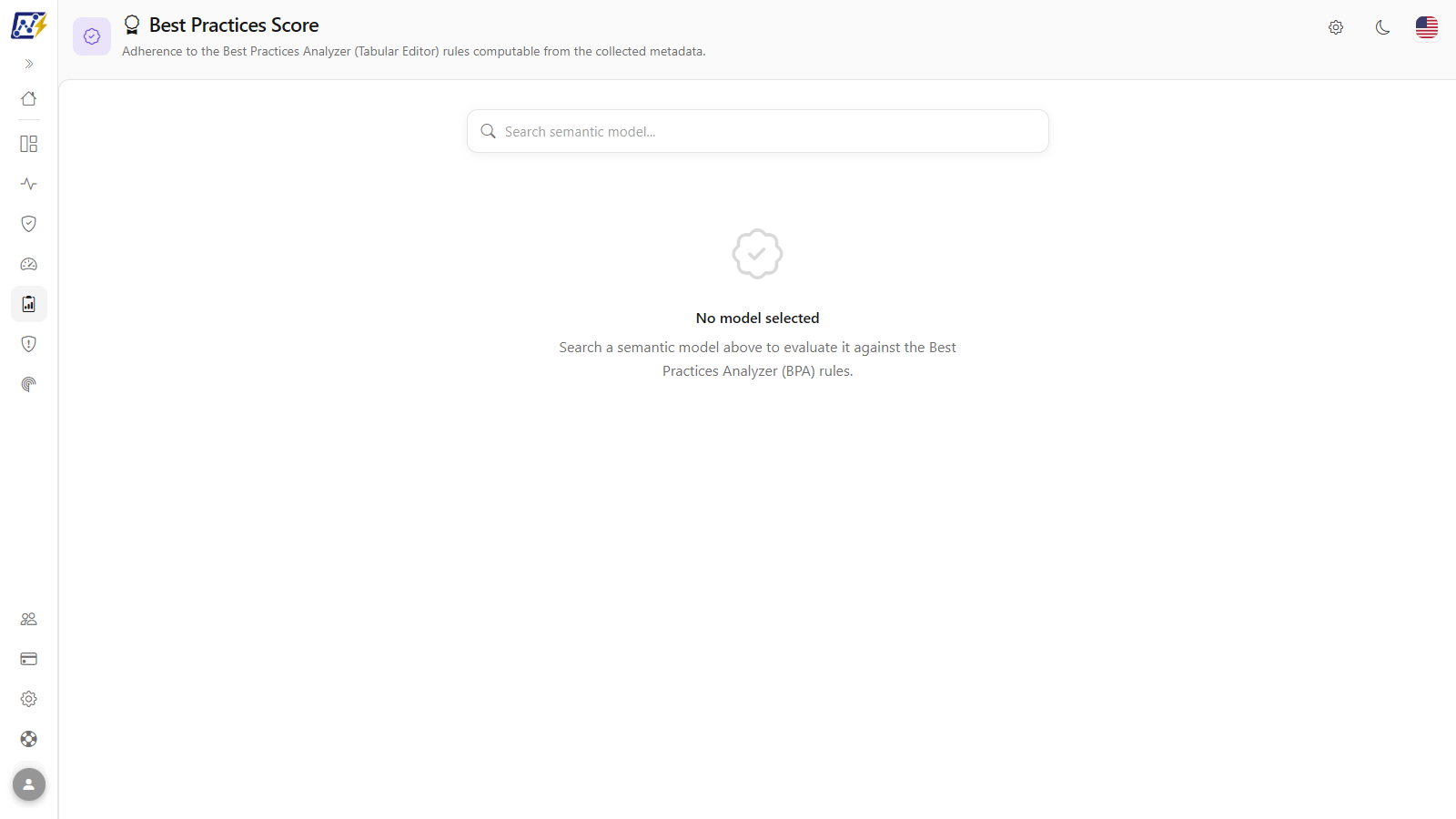
**How it works:** with no model chosen, the screen shows *No model selected*. If the analysis fails, *Could not analyze this semantic model.* appears. A new search replaces the previous result.

### Overall score

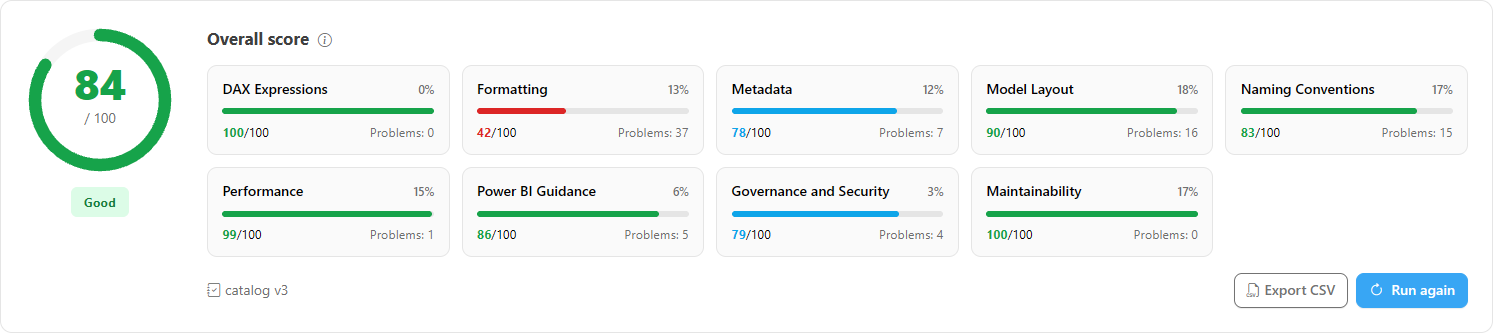
**What it is:** the **0 to 100** gauge with the status **Good** (80 to 100, green), **Attention** (60 to 79, amber) or **Needs attention** (0 to 59, orange).

**What it is for:** giving a single rating of adherence to best practices, useful for prioritizing technical debt across models.

<figure><picture><source srcset="/files/yJjr2O4gajPeNjl3GFTj" media="(prefers-color-scheme: dark)"><img src="https://3938213054-files.gitbook.io/~/files/v0/b/gitbook-x-prod.appspot.com/o/spaces%2FH2bFRBmIfyK3kwVKbldl%2Fuploads%2Fgit-blob-7560ed06b6c8afa19d2114c85546f3d45b31adf8%2Fpm-qualidade-score-boas-praticas-score-geral-en.png?alt=media" alt="Overall score gauge with the status and the category cards"></picture><figcaption><p>Overall score and category cards</p></figcaption></figure>

**How it works:** the overall score is the average of the categories weighted by proportional weights (see [Categories and weights](#categories-and-weights)). It is the same value as the *Best Practices Score* column in the [Environment Inventory](/en/power-monitor/qualidade-de-dados/inventario-do-ambiente.md).

### Category cards

**What it is:** one card for each evaluated category (up to nine), with its weight (percentage in the corner of the card), the rating (0 to 100, with a bar that is green from 80, blue from 60 to 79 and red below 60) and the number of **Problems**. The information icon next to the title explains that categories with no applicable checks are left out and the weights are redistributed.

**What it is for:** seeing which aspects of the model (DAX, formatting, metadata, layout, naming, performance, guidance, governance and security, maintainability) concentrate the problems.

<figure><picture><source srcset="/files/VbEnD5iTgpPCD3VMFRIp" media="(prefers-color-scheme: dark)"><img src="https://3938213054-files.gitbook.io/~/files/v0/b/gitbook-x-prod.appspot.com/o/spaces%2FH2bFRBmIfyK3kwVKbldl%2Fuploads%2Fgit-blob-371fd9ec844a96f22a80cedd72e551844d6ee29b%2Fpm-qualidade-score-boas-praticas-filtro-categoria-en.png?alt=media" alt="Selected category card and the filtered table, with the Clear filter button"></picture><figcaption><p>Selected card filtering the findings table</p></figcaption></figure>

**How to use:**

1. Click a category card (for example, **Performance**) to see only its problems.
2. To undo, click the card again or **Clear filter: Performance**, above the table.

### Findings table

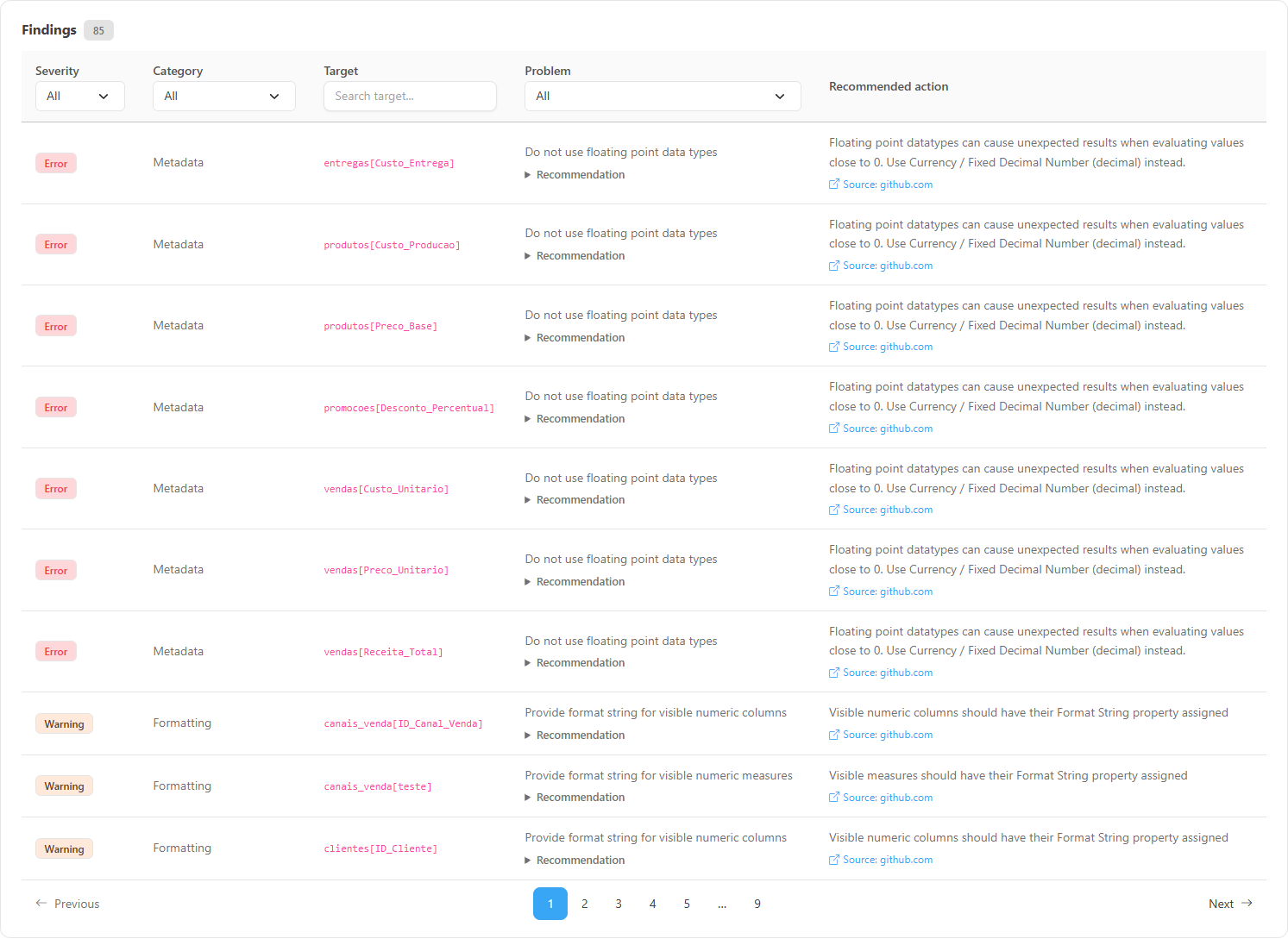
**What it is:** the list of the model's problems, with **Severity**, **Category**, **Target**, **Problem** and **Recommended action**. On each row, the expandable **Recommendation** item explains what to do, and below the action you find the **Source: …** link to the rule documentation (Power Monitor heuristics have no link). When a rule carries a detail (for example, the name of the function or column involved), it appears in smaller text below the problem name.

**What it is for:** conducting the model review rule by rule, with the suggested fix.

<figure><picture><source srcset="/files/wMk8WiPOIbMarOjG9LZ1" media="(prefers-color-scheme: dark)"><img src="https://3938213054-files.gitbook.io/~/files/v0/b/gitbook-x-prod.appspot.com/o/spaces%2FH2bFRBmIfyK3kwVKbldl%2Fuploads%2Fgit-blob-a8af033ae992fe7382bc10e5bd3aa39f85706404%2Fpm-qualidade-score-boas-praticas-problemas-en.png?alt=media" alt="Findings table with the Recommended action column and the Source link"></picture><figcaption><p>Problems with the recommended action and the rule source</p></figcaption></figure>

**How to use:**

1. Use the header lists: **Severity** (**All**, *Error*, *Warning*, *Info*), **Category** (**All** or a category) and **Problem** (**All** or a specific rule).
2. Type part of the name of a table, column, measure or relationship in **Search target...** (**Target** column).
3. Click **Recommendation** to read the fix guidance and, to read a rule's documentation, click the **Source:** link (for example, *Source: learn.microsoft.com*), below the **Recommended action**. The page opens in a new tab, with the complete explanation and fix examples.

**How it works:** the filters are combined; if nothing matches, the table shows *No problems match the applied filters.* If there are no problems at all, *No problems found. Excellent!* appears. Problems already come sorted by severity (Error, then Warning, then Info), category and target; the columns have no sorting of their own. The table shows 10 problems per page: use **Items per page** (10, 25, 50 or 100) and the pagination, and note that changing a filter returns to the first page. On narrow screens (mobile), each problem becomes a card and the filters move to a bar above the list.

{% hint style="info" %}
Rule names, descriptions and recommendations are displayed in the interface language. To tackle what weighs most first, filter **Severity** = *Error*: error rules (division without `DIVIDE`, floating point, Auto Date/Time and credentials in code) deduct twice as much as a warning.
{% endhint %}

### Rules not evaluated and coverage

**What it is:** the expandable **Rules not evaluated (N)** item, below the cards (it only appears when some rule was left out) and, when part of the model metadata is missing, a warning banner saying that the rules that depend on it were not evaluated.

**What it is for:** knowing what the score did **not** look at. A rule that could not be evaluated never counts as passed or failed: it simply does not enter the score.

<figure><picture><source srcset="/files/Gaj34ZSYiwVvSr93b5eH" media="(prefers-color-scheme: dark)"><img src="https://3938213054-files.gitbook.io/~/files/v0/b/gitbook-x-prod.appspot.com/o/spaces%2FH2bFRBmIfyK3kwVKbldl%2Fuploads%2Fgit-blob-20253d76951dc338aba5cfc654c46f853a5dea49%2Fpm-qualidade-score-boas-praticas-regras-nao-avaliadas-en.png?alt=media" alt="Rules not evaluated item expanded with the name of each rule and the reason"></picture><figcaption><p>Rules not evaluated and the reason for each one</p></figcaption></figure>

Each rule in the list shows the reason, for example: *Model metadata (TMSL) unavailable*, *No report is linked to the model*, *Model definition (TMSL) not captured yet*, *Data not captured yet* or *Context data (reports, governance, security) was not loaded for this analysis*. The report usage rules, for example, are only evaluated when the model has reports with a captured structure (see [Report Structure](/en/power-monitor/mapeamento/estrutura-de-relatorios.md)).

### Catalog version

**What it is:** the *catalog vN* badge, next to the **Export CSV** and **Run again** buttons.

**What it is for:** the score can change when the rule set changes (new rules or changed texts). Compare ratings only between analyses of the same catalog version.

### Export CSV

**What it is:** the **Export CSV** button, below the cards.

**What it is for:** recording the review and distributing the fixes.

**How to use:**

1. With a model assessed, click **Export CSV** (disabled when there are no problems).
2. The file `bpaScore-<model name>-<date>.csv` is downloaded.

**How it works:** the file contains **all** the model's problems (the screen filters do not apply to the export) with the columns Severity, Category, Target, Problem, Recommended action, Recommendation and the rule's **Source (URL)**.

### Run again

**What it is:** the **Run again** button, next to **Export CSV**.

**What it is for:** checking whether the published fixes improved the rating.

**How to use:**

1. Publish the model changes in Power BI and wait for the next scan (see [Mapping](/en/power-monitor/mapeamento.md)).
2. With the model open, click **Run again** (or select the model again in the search).
3. Compare the new overall rating and the number of **Problems** in each category.

**How it works:** the analysis uses the most recent metadata already collected; nothing is run against the model and nothing is changed.

### Adherence tab in the model details

**What it is:** the same analysis inside the details of a semantic model, on the **Best Practices Adherence** tab (next to **AI Adherence**), opened from screens such as Governance › Semantic Models.

**How it works:** the tab shows the overall score, the category cards, the problems table, **Export CSV** and **Run again** for the open model, without the search field. The analysis starts when you open the tab (*Analyzing the model...*); if it fails, *Could not analyze this semantic model.* appears.

## Categories and weights

There are nine categories. Unlike the AI Score, **the weights are not fixed**: each category weighs in proportion to the number of objects it assessed in that model, and categories with no applicable check are left out (the weights of the others are redistributed). A model with many visible columns and measures, for example, will have Naming Conventions and Formatting with a higher weight. The percentage of each category appears in the corner of the card.

| Category                    | Focus                                                                   |
| --------------------------- | ----------------------------------------------------------------------- |
| **DAX Expressions**         | Quality and performance of DAX formulas and security filters            |
| **Formatting**              | Format strings on columns and measures                                  |
| **Metadata**                | Data types, default summarization and dates stored as text              |
| **Model Layout**            | Auto Date/Time, relationships, date table and sorting                   |
| **Naming Conventions**      | Naming conventions for objects and relationship columns                 |
| **Performance**             | Unused objects (in the model and in reports) and unnecessary dimensions |
| **Power BI Guidance**       | Official Microsoft recommendations and Power Query hygiene              |
| **Governance and Security** | Credentials in code, RLS, sensitivity label, endorsement and owners     |
| **Maintainability**         | Default names, local sources and unused expressions                     |

## The 55 rules assessed

The rules come from three families: the official **Best Practice Analyzer (Tabular Editor)** set, **Microsoft guidelines** (Microsoft Learn) and **Power Monitor heuristics**. When a rule has a public source, the screen shows the **Source** link (see [Rule origin](#rule-origin)). Names and descriptions appear in the interface language.

### DAX Expressions

| Rule                                                           | Severity | When it triggers                                                                                    |
| -------------------------------------------------------------- | -------- | --------------------------------------------------------------------------------------------------- |
| Avoid division (use DIVIDE function instead)                   | Error    | A measure or calculated column uses `/` with a denominator that is not a constant                   |
| Column references should be fully qualified                    | Warning  | Column reference without the table name (`[Column]` instead of `Table[Column]`)                     |
| Measure references should be unqualified                       | Warning  | Measure reference with a table name (`Table[Measure]`)                                              |
| Revisit TODO expressions                                       | Info     | The expression contains the word `TODO`                                                             |
| Avoid the IFERROR function                                     | Warning  | The expression uses `IFERROR`                                                                       |
| Prefer SUMMARIZECOLUMNS over SUMMARIZE                         | Warning  | The expression uses `SUMMARIZE`                                                                     |
| Prefer TREATAS over INTERSECT for virtual relationships        | Info     | The expression uses `INTERSECT`                                                                     |
| Use variables in complex DAX expressions                       | Info     | Expression longer than 150 characters and without `VAR`                                             |
| Reduce RELATED usage in calculated columns                     | Info     | A calculated column uses `RELATED`                                                                  |
| Avoid FILTER over a whole table as a filter argument           | Warning  | `CALCULATE` or `CALCULATETABLE` receives `FILTER` over a whole table as a filter argument           |
| Use SELECTEDVALUE instead of IF(HASONEVALUE(...), VALUES(...)) | Info     | The `IF(HASONEVALUE(x), VALUES(x), ...)` pattern, which `SELECTEDVALUE` replaces                    |
| Use COUNTROWS instead of COUNT over a column                   | Info     | `COUNT` or `COUNTA` over a single column                                                            |
| Avoid converting BLANK to zero or empty text                   | Info     | Converts BLANK to zero or empty text (`IF(ISBLANK(x), 0, x)`, `COALESCE(x, 0)`)                     |
| Use variables instead of EARLIER and EARLIEST                  | Info     | The expression uses `EARLIER` or `EARLIEST`                                                         |
| Avoid volatile functions in calculated columns                 | Warning  | A calculated column uses a volatile function (the value is only computed at refresh and goes stale) |
| Use USERPRINCIPALNAME instead of USERNAME in security filters  | Warning  | A security role filter uses `USERNAME()`; prefer `USERPRINCIPALNAME()`                              |

### Formatting

| Rule                                               | Severity | When it triggers                                       |
| -------------------------------------------------- | -------- | ------------------------------------------------------ |
| Provide format string for visible numeric columns  | Warning  | Visible numeric or date column without a format string |
| Provide format string for visible numeric measures | Warning  | Visible measure without a format string                |

### Metadata

| Rule                                 | Severity | When it triggers                                                        |
| ------------------------------------ | -------- | ----------------------------------------------------------------------- |
| Do not use floating point data types | Error    | Floating point (Double) column. Use Fixed Decimal/Currency              |
| Don't summarize numeric columns      | Info     | Visible numeric column with a default summarization other than "None"   |
| Dates should not be stored as text   | Info     | Visible text column whose name looks like a date (name-based heuristic) |

### Model Layout

| Rule                                            | Severity | When it triggers                                                                            |
| ----------------------------------------------- | -------- | ------------------------------------------------------------------------------------------- |
| Disable auto date/time                          | Error    | The model contains automatic Auto Date/Time tables                                          |
| Hide foreign key columns                        | Info     | A column on the "many" side of a relationship is visible                                    |
| Avoid many-to-many relationships                | Warning  | Many-to-many relationship                                                                   |
| Table without relationships                     | Info     | Visible table with no relationship (measure-only tables and calculation groups are skipped) |
| Inactive relationship never activated           | Info     | An inactive relationship that no expression activates with `USERELATIONSHIP`                |
| Mark the date table                             | Warning  | There is a calendar-like table with date columns, but no table is marked as the date table  |
| Sort month and weekday names by a number column | Warning  | Text column with month or weekday names and no sort-by column (it sorts alphabetically)     |

### Naming Conventions

| Rule                                                        | Severity | When it triggers                                                                                                                                                                   |
| ----------------------------------------------------------- | -------- | ---------------------------------------------------------------------------------------------------------------------------------------------------------------------------------- |
| Names of columns in relationships should be the same        | Warning  | The columns on both sides of a relationship have different names (with several relationships between the same tables, the source column name must end with the target column name) |
| Column and hierarchy names must start with uppercase letter | Warning  | A visible column starts with a lowercase letter                                                                                                                                    |
| Measure and table names must start with uppercase letter    | Warning  | A visible table or measure starts with a lowercase letter                                                                                                                          |
| Avoid CamelCase on visible columns and hierarchies          | Warning  | Visible column name in CamelCase, without spaces                                                                                                                                   |
| Avoid CamelCase on visible measures and tables              | Warning  | Visible table or measure name in CamelCase, without spaces                                                                                                                         |

### Performance

| Rule                                                                    | Severity | When it triggers                                                                                |
| ----------------------------------------------------------------------- | -------- | ----------------------------------------------------------------------------------------------- |
| Remove unused columns                                                   | Warning  | Hidden column not referenced by any DAX expression or used in a relationship                    |
| Remove unused measures                                                  | Info     | Hidden measure not referenced by any DAX expression                                             |
| Avoid single-attribute dimensions that are not shared by multiple facts | Warning  | Dimension linked to a single table with at most one visible attribute besides the keys          |
| Table not used by any report                                            | Warning  | No report linked to the model uses the table (a single finding covers the table and its fields) |
| Column not used by any report                                           | Warning  | No report uses the column (sort-by columns, keys and hierarchy levels are skipped)              |
| Measure not used by any report                                          | Info     | No report uses the measure                                                                      |

### Power BI Guidance

| Rule                                                            | Severity | When it triggers                                                                                               |
| --------------------------------------------------------------- | -------- | -------------------------------------------------------------------------------------------------------------- |
| Avoid bidirectional relationship filtering                      | Warning  | Relationship with cross-filtering in both directions                                                           |
| Use integer keys for relationships instead of text              | Info     | A relationship uses a text column as its key                                                                   |
| Prefer Power Query transformations over many calculated columns | Info     | Visible table with more than 3 calculated columns                                                              |
| Avoid volatile functions in Power Query                         | Warning  | Power Query uses `DateTime.LocalNow`, `DateTimeZone.FixedLocalNow`, `DateTimeZone.LocalNow` or `Number.Random` |
| Consolidate repeated column-rename steps in Power Query         | Info     | More than one `Table.RenameColumns` step in the table query                                                    |
| Consolidate repeated data-type conversion steps in Power Query  | Info     | More than one `Table.TransformColumnTypes` step in the table query                                             |

### Governance and Security

| Rule                                                          | Severity | When it triggers                                                                                                                                    |
| ------------------------------------------------------------- | -------- | --------------------------------------------------------------------------------------------------------------------------------------------------- |
| Credentials stored in Power Query code                        | Error    | A password, API key, token, SAS or Authorization header written in a query or shared expression (only the kind of secret is shown, never its value) |
| Security role without a row filter                            | Warning  | A security role (other than administrator) with no row filter on any table                                                                          |
| Bidirectional relationship in a model with row-level security | Warning  | Bidirectional relationship on the row-level security path, or bidirectional cross-filtering on a table with security                                |
| Semantic model without a sensitivity label                    | Warning  | The model has no Microsoft Purview sensitivity label (only meaningful in tenants that use labels)                                                   |
| Semantic model that feeds reports is not endorsed             | Info     | A model with at least one report that is neither promoted nor certified                                                                             |
| Semantic model without a responsible person                   | Warning  | No responsible person registered in the model governance metadata                                                                                   |
| Semantic model without a criticality level                    | Info     | No criticality registered in the model governance metadata                                                                                          |

### Maintainability

| Rule                                          | Severity | When it triggers                                                                                                           |
| --------------------------------------------- | -------- | -------------------------------------------------------------------------------------------------------------------------- |
| Object with a default name                    | Info     | Table, column or measure with a default name (Table1, Query1, Column1, Measure 1...)                                       |
| Data source on a local drive or network share | Warning  | A query reads a hard-coded local path (`C:\...`) or a network share                                                        |
| Unused shared expression or parameter         | Info     | A parameter, function or shared query that no other expression references (RangeStart and RangeEnd parameters are ignored) |

## Rule origin

Each rule of the Best Practices Score belongs to one of these families. The screen does not show an origin badge (that only exists in the [Report Best Practices Score](/en/power-monitor/qualidade-de-dados/score-de-boas-praticas-de-relatorios.md)): the origin is indicated by the **Source** link and by the description text.

| Origin                                      | How it appears on screen                                                                                                           |
| ------------------------------------------- | ---------------------------------------------------------------------------------------------------------------------------------- |
| **Best Practice Analyzer (Tabular Editor)** | The official Tabular Editor rule set. The rule carries the **Source** link to the rules repository                                 |
| **Recognized community articles**           | Some DAX and Power Query rules follow a best practices article published by the community, cited in the **Source** link            |
| **Microsoft guidelines**                    | The rule follows a page of Microsoft's official documentation (Microsoft Learn), cited in the **Source: learn.microsoft.com** link |
| **Power Monitor heuristic**                 | A Power Monitor rule with no external source: there is no **Source** link and the description says it is a heuristic               |

Heuristics are useful signals, but not official rules: assess case by case whether they make sense for your model.

## Rules and behavior

* **Score calculation.** Each category starts at 100 and loses points according to the proportion of problems over the objects assessed (Error = 2, Warning = 1, Info = 0.5). The overall score is the average of the categories weighted by the proportional weights described above. It is the same value displayed in the *Best Practices Score* column of the [Environment Inventory](/en/power-monitor/qualidade-de-dados/inventario-do-ambiente.md), which considers a score below 60 to be **low**.
* **Metadata only.** The rules are assessed on what the scan collects (names, visibility, types, format strings, default summarization, DAX and Power Query expressions, relationships). Nothing is run against the model and nothing is changed.
* **Rules not evaluated.** Rules that depend on data that does not exist yet for the model (reports with a captured structure, the full model definition, row-level security, governance metadata) are left out of the calculation and listed under **Rules not evaluated**; they never count as "passed".
* **Known limitations.** The DAX checks look for patterns in the expression text; a function name inside a comment can produce a false positive. The *Remove unused columns* rule only assesses hidden columns and does not see usage in column variations (nor, while the full model definition has not been captured yet, sort-by-column and hierarchies), so it may fail to flag unused columns (it never flags too many). For a complete usage analysis that takes reports into account, use [Model Cleanup](/en/power-monitor/performance/limpeza-de-modelo.md).
* **Auto Date/Time tables** are ignored in the other rules (they generate only the *Disable auto date/time* error).
* **Workspace scope.** The report usage rules consider the reports of the model that your user can see (and, one level up, the composite models built on top of it). With visibility restricted to some workspaces, an object used only by a report outside your scope may appear as unused; confirm with someone who has full visibility before removing anything.
* **Microsoft standard artifacts.** Models created by Microsoft itself (Fabric Capacity Metrics, usage metrics and so on) do not appear in the model search, because they are not analyzed. See [Microsoft standard artifacts](/en/power-monitor/qualidade-de-dados/exposicao-de-dados.md#microsoft-standard-artifacts).

## Step by step: common scenarios

### How to review a model before it goes to production

{% stepper %}
{% step %}

### Assess the model

Select the model and write down the **Overall score**.
{% endstep %}

{% step %}

### Address the errors

Filter **Severity** = *Error* and fix all items in Power BI Desktop or Tabular Editor.
{% endstep %}

{% step %}

### Review the warnings by category

Click the highest-weight cards and decide, item by item, what to fix and what to accept as an exception.
{% endstep %}

{% step %}

### Record and reassess

Export the CSV to record the review; after publishing, wait for the scan and click **Run again** to confirm the new rating.
{% endstep %}
{% endstepper %}

## Frequently asked questions

<details>

<summary>Why does a category's weight change from one model to another?</summary>

In the Best Practices Score, the weight of each category is proportional to the number of objects it assessed in that model. A model with few DAX expressions will have a low weight for the DAX Expressions category, for example.

</details>

<details>

<summary>I fixed the problems, but the rating is still the same.</summary>

The analysis uses the metadata from the latest scan. Publish the changes, wait for the next collection cycle and click **Run again**.

</details>

<details>

<summary>"Remove unused columns" flagged a column that is used in a report.</summary>

That rule considers only the model (DAX expressions and relationships) and assesses only **hidden** columns. Usage in reports is assessed by separate rules (for example, *Column not used by any report*), which depend on the report structure having been captured. For a complete analysis of visuals, filters and conditional formatting, see [Model Cleanup](/en/power-monitor/performance/limpeza-de-modelo.md).

</details>

## Related pages

* [AI Score](/en/power-monitor/qualidade-de-dados/score-de-ia.md)
* [Report Best Practices Score](/en/power-monitor/qualidade-de-dados/score-de-boas-praticas-de-relatorios.md): the equivalent rules for reports
* [Model Cleanup](/en/power-monitor/performance/limpeza-de-modelo.md)
* [Environment Inventory](/en/power-monitor/qualidade-de-dados/inventario-do-ambiente.md)
* [Performance › Performance Assessment](/en/power-monitor/performance/avaliacao-de-performance.md): the performance assessment reuses these rules


---

# Agent Instructions
This documentation is published with GitBook. GitBook is the documentation platform designed so that both humans and AI agents can read, navigate, and reason over technical content effectively. Learn more at gitbook.com.

## Querying This Documentation
If you need additional information that is not directly available in this page, you can query the documentation by asking a question.

Perform an HTTP GET request on the following URL with the `ask` and `goal` query parameters:

```
GET https://docs.powermonitor.com.br/en/power-monitor/qualidade-de-dados/score-de-boas-praticas-bpa.md?ask=<question>&goal=<user_goal>
```

`ask` is the immediate question: it should be specific, self-contained, and written in natural language.
`goal` is what the user is ultimately trying to achieve, the reason they need the answer. Sharing it helps GitBook give you a better, more relevant answer. A goal is most helpful when it describes the outcome the user wants rather than restating the question. For example, with `ask=how do I create an API token`, a goal like `automate deployments from our CI pipeline` lets GitBook tailor the answer to that use case.

The response will contain a direct answer to the question and relevant excerpts and sources from the documentation.

Use this mechanism when the answer is not explicitly present in the current page, you need clarification or additional context, or you want to retrieve related documentation sections.